
About Techmeme Alerter
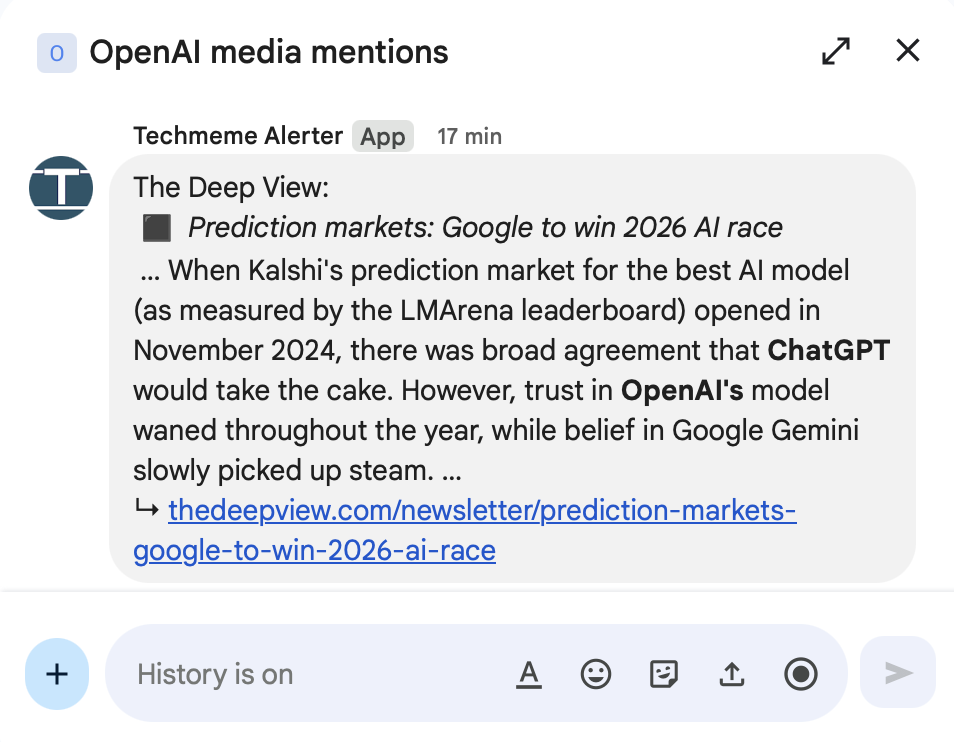
Techmeme Alerter is a Google Chat™ application that delivers real-time alerts of news coverage directly to Google Chat™ spaces. It is intended for use by organizations that have signed up with Techmeme's media monitoring services. When installed in a Google Chat™ space, users will receive messages that excerpt and link to news coverage that matches criteria users have specified in advance as soon as Techmeme crawls it.
The app's primary function is delivering outbound notifications. It also responds to basic commands such as help and about to assist users. The app does not receive or access ordinary message content in spaces where it is installed.
Key Features
The Techmeme Alerter app is designed with simplicity and privacy in mind:
- Delivers real-time notifications to Google Chat™ spaces
- Sends a welcome message when added to a space
- Responds to
helpandaboutcommands - Does NOT receive or access ordinary message content in spaces where it is installed
- Does NOT track user behavior or activity
- Does NOT access user contacts, files, or any other Google Workspace™ data beyond initial installation information
Available Commands
You can interact with Techmeme Alerter using these commands:
@Techmeme Alerter help— Display help information and setup instructions@Techmeme Alerter about— Learn more about Techmeme
Administrator Setup Guide
This section is intended for Google Workspace™ administrators who need to make the Techmeme Alerter app available to users within their organization.
Prerequisites
Before proceeding, ensure you have administrator access to your organization's Google Workspace™ Admin Console.
Installation Steps
Access the Google Workspace Marketplace™ listing
Visit the Techmeme Alerter app listing page. Alternatively, navigate to the Google Workspace Marketplace™ and search for "Techmeme Alerter".
Install for your domain
Click "Admin Install" and select whether to install for all users in your organization or for specific organizational units.
Review and accept permissions
Review the requested permissions. The app requires permission to post messages to Google Chat™ spaces and to receive messages when users interact with the app.
Complete installation
Click "Allow" to complete the installation. The app will now be available to the selected users in your organization.
Note: After installation, users will be able to add the Techmeme Alerter app to Google Chat™ spaces where they have the appropriate permissions.
End User Setup Guide
Once your administrator has made the Techmeme Alerter app available in your Google Workspace™, follow these steps to add it to a Google Chat™ space.
Adding Techmeme Alerter to a Space
Create a new Google Chat™ space
Visit chat.google.com which will redirect you to Google Chat™ for your workspace. Create a new space where Techmeme Alerter will be posting. Name it something evocative of its purpose (e.g. "Media Mentions" or "Alerts from Techmeme").
Open the Google Chat™ space
Navigate to the new Google Chat™ space where Techmeme Alerter will be posting. You must have permission to add apps to this space.
Access space settings
Click on the space name at the top to open the dropdown menu, then select "Apps & integrations" (or "Manage webhooks & bots" in some versions).
Add the app
Click "Add apps" and search for "Techmeme Alerter" in the list of available apps. Select it to add to your space.
Confirm installation
The Techmeme Alerter app will now appear in your space and send a welcome message with instructions.
Let us know you're ready
Tell us you're ready to receive messages by emailing service@techmeme.com or your Techmeme contact, and we will activate the service. Note that if you installed the app in multiple spaces, you may need to clarify which one should receive messages. To do so, navigate to the space, click on the space name at the top to open the dropdown, and then click "Copy link to this space". The link will look something like https://chat.google.com/room/AAQADwDAyN6 and contains its Space ID. Mention that link when you email us.
Removing the App
If you wish to stop receiving notifications, you can remove the Techmeme Alerter app from your space at any time through the same "Apps & integrations" menu.
Support
If you have questions, encounter issues, or need assistance with the Techmeme Alerter app, please contact our support team.
service@techmeme.comTerms of Service
1. Introduction
These Terms of Service ("Terms") govern your use of the Techmeme Alerter application ("App") for Google Chat™, provided by Epivoz Corporation ("Company," "we," "us," or "our"), the owner and operator of Techmeme.
By installing or using the App, you agree to these Terms. If you do not agree, do not install or use the App.
2. Description of Service
The Techmeme Alerter App is a Google Chat™ integration that delivers notification messages to Google Chat™ spaces. The App's primary function is to post alert messages to spaces where it has been added. The App also responds to basic user commands (such as "help" and "about") to provide information and assistance. The App does not receive or access ordinary message content in spaces where it is installed.
3. Use of the App
You may use the App to receive alert notifications in Google Chat™ spaces where the App has been installed. You agree to:
- Use the App only for its intended purpose of receiving notifications and using its basic commands
- Comply with Google™'s Terms of Service and Acceptable Use Policies
- Not attempt to reverse engineer, modify, or interfere with the App's functionality
4. Data and Privacy
Upon installation, the App collects Space IDs of Chat Spaces where it is installed. The App does not receive or access ordinary message content in spaces where it is installed. For more information, please see our Privacy Policy.
5. Intellectual Property
The App and its original content, features, and functionality are owned by Epivoz Corporation and are protected by applicable intellectual property laws. Techmeme is a trademark of Epivoz Corporation.
6. Disclaimer of Warranties
THE APP IS PROVIDED "AS IS" AND "AS AVAILABLE" WITHOUT WARRANTIES OF ANY KIND, EITHER EXPRESS OR IMPLIED, INCLUDING BUT NOT LIMITED TO IMPLIED WARRANTIES OF MERCHANTABILITY, FITNESS FOR A PARTICULAR PURPOSE, AND NON-INFRINGEMENT.
We do not warrant that the App will be uninterrupted, timely, secure, or error-free.
7. Limitation of Liability
TO THE FULLEST EXTENT PERMITTED BY LAW, EPIVOZ CORPORATION SHALL NOT BE LIABLE FOR ANY INDIRECT, INCIDENTAL, SPECIAL, CONSEQUENTIAL, OR PUNITIVE DAMAGES, OR ANY LOSS OF PROFITS OR REVENUES, WHETHER INCURRED DIRECTLY OR INDIRECTLY, OR ANY LOSS OF DATA, USE, GOODWILL, OR OTHER INTANGIBLE LOSSES RESULTING FROM:
- Your use or inability to use the App
- Any interruption or cessation of the App's functionality
- Any errors or omissions in the App's content or functionality
8. Modifications to the Service
We reserve the right to modify, suspend, or discontinue the App at any time, with or without notice. We shall not be liable to you or any third party for any modification, suspension, or discontinuation of the App.
9. Changes to Terms
We may update these Terms from time to time. We will notify users of any material changes by posting the new Terms on this page and updating the "Effective Date" above. Your continued use of the App after any changes constitutes acceptance of the new Terms.
10. Governing Law
These Terms shall be governed by and construed in accordance with the laws of the State of California, United States, without regard to its conflict of law provisions.
11. Contact Us
If you have any questions about these Terms, please contact us at:
Epivoz Corporation
Email: service@techmeme.com
Website: https://www.techmeme.com
Privacy Policy
1. Introduction
This Privacy Policy describes how Epivoz Corporation ("Company," "we," "us," or "our"), the owner and operator of Techmeme, handles information in connection with the Techmeme Alerter application ("App") for Google Chat™.
We are committed to protecting your privacy. This policy explains our data practices, which are designed to be as minimal and transparent as possible.
2. Information We Collect
Upon installation, the App collects Space IDs of Chat Spaces where it is installed. This information is used to deliver notifications to the correct spaces.
The App does NOT:
- Receive or access ordinary message content in spaces where it is installed
- Track user behavior or activity beyond the initial installation
- Use cookies or similar tracking technologies
- Access user contacts, files, or any other Google Workspace™ data beyond the installation information described above
3. How the App Works
The App's primary function is delivering outbound notifications to Google Chat™ spaces. When users send messages to the App (such as commands like "help" or "about"), the App processes the message in real-time to generate an immediate response. Message content is not stored, logged, or retained after the response is sent.
4. Information Sharing and Disclosure
The Space IDs we collect are used solely for the purpose of delivering notifications. We do not share, sell, rent, or trade this information with third parties except as necessary to provide the service or as required by law.
5. Data Security
We maintain appropriate technical and organizational security measures to protect the Space IDs we collect, as well as the App's infrastructure, to ensure reliable and secure service delivery.
6. Third-Party Services
The App operates within the Google Chat™ platform and is subject to Google™'s Privacy Policy and Terms of Service. We encourage you to review Google™'s privacy practices at https://policies.google.com/privacy.
7. Children's Privacy
The App does not collect any personal information from anyone, including children under the age of 13. The App is intended for use by businesses and organizations using Google Workspace™.
8. Your Rights
If you wish to stop receiving notifications from the App, you may remove the App from your Google Chat™ space at any time, at which point we will delete the associated Space IDs from our records.
9. Data Retention
We retain Space IDs for as long as the App remains installed in the associated Google Chat™ space. When the App is removed from a space, we delete the associated data from our records.
10. International Data Transfers
The Space IDs we collect may be transferred to and processed in the United States, where our servers are located. By using the App, you consent to the transfer of this information to the United States.
11. Changes to This Privacy Policy
We may update this Privacy Policy from time to time. We will notify users of any material changes by posting the new Privacy Policy on this page and updating the "Effective Date" above.
We encourage you to review this Privacy Policy periodically for any changes. Changes to this Privacy Policy are effective when they are posted on this page.
12. Compliance
This Privacy Policy is intended to align with applicable privacy laws and regulations, including:
- General Data Protection Regulation (GDPR)
- California Consumer Privacy Act (CCPA)
- Google™ API Services User Data Policy
13. Contact Us
If you have any questions or concerns about this Privacy Policy or our privacy practices, please contact us at:
Epivoz Corporation
Email: service@techmeme.com
Website: https://www.techmeme.com
In summary: The Techmeme Alerter App collects Space IDs upon installation to deliver notifications. The App does not receive or access ordinary message content in spaces where it is installed.